MySpecialDay3.7.2
Publisher Description


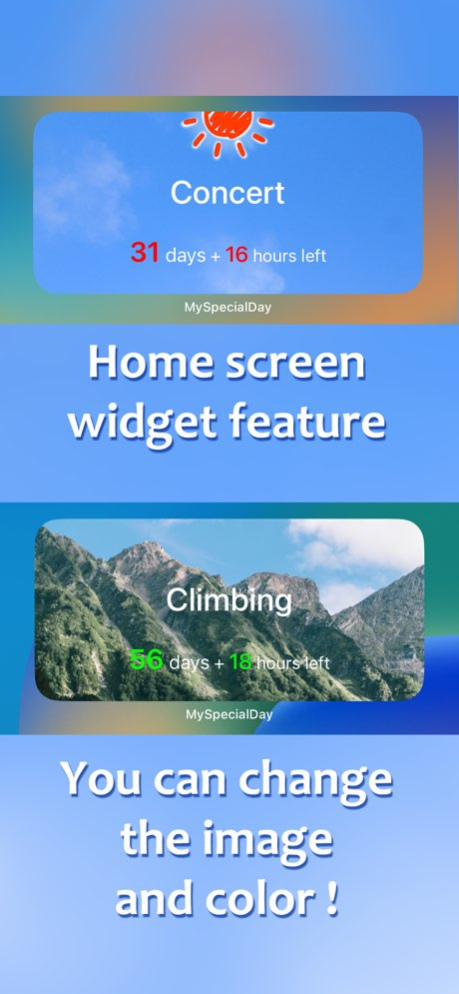
This app counts down until a special day of you.
It can notify at the daily appointed time.
And it can also notify the number of remaining days.
Your feeling will be raised by the scheduled day.
You can share the schedule.
**Lite Version ---> Search "ScheduledDay".
Version History - When displaying only the number of days, the current day is set to 0.
For example, if your appointment is around noon
If the previous night is the 1day (0 day and 13 hours), and after midnight, it becomes 0 day (0 day and 12 hours), making it easier to understand the current day.
- Fixed a bug where links to emails and apps were not working.
Thanks. 3.7.2 09/11/2023 - Compatible with screen sizes of iPhone X and later models without a home button.
- The text color of the widget can now be changed as default.
- You can now change the background and text color in the app as default.
Please try to customize.
- You can now "Move to PastEvents" from the schedule end message.
Thank you. 3.7.0 04/14/2023 Added lock screen widgets for iOS 16.
Thanks. 3.4.0 10/11/2022 From this update, it will be iOS 14 or later.
Only new widgets for iOS 14 and later, old widgets are not included.
When using on iOS 13 or earlier, the old version will be downloaded.
After purchasing the add-on, you can now change the text color of the widget.
Check from the setting screen. 3.3.0 08/30/2022 Added a new widget for iOS 14 !
You can place it on the home screen and know the remaining time without launching the app.
You can freely change the background of this new widget from within the app. 3.2.0 11/04/2020 I drew a new illustration of the chick for the introduction View.
and maintenance fixes for recent iPhone.
Thanks. 3.1.1 05/11/2019 - Added the widget !
There are three kinds of time displayed on the widget.
It can be changed from the setting in the app.
- Changed some illustration etc of the first explanation.
Thanks. 3.1.0 03/02/2018 - The issue when using Pass-code feature.
Fixed the issue that content is displayed momentarily on some models when booting from the state where the app is terminated. 3.0.1 11/07/2017 - Notification feature changed for iOS 11.
- Twitter accounts are managed within the app.
Let's set your special day :) 3.0.0 10/14/2017 Bug fixes for Add-on. 2.3.5 02/09/2017 Emoji falls when you slide the screen.
Minor bug fixes.
[Add-on] Color picker has been changed.
Please use in the future ^^/ 2.3.3 04/22/2016 - Bug fixes for iOS 9 and later.
Fix the problems caused by 24-Hour Time setting in the Settings App. 2.3.1 12/03/2015 Bug fixes for iOS 9.
Updated the share feature.
Thanks :) 2.3.0 10/14/2015 * iOS 8 and later,
Description is displayed when you start the app first time.
The description, you can show from the settings.
Thank you :) 2.2.0 01/15/2015 Fixed an issue that user can not be set the notification, with new installation in iOS 8 and later. 2.1.1 11/01/2014 Supports iOS 8 .
And bug fixes . 2.1.0 10/19/2014 - Added the LINE to shared destination from the double-tap the screen.
The share button for the LINE will be displayed if you have installed the LINE. 2.0.4 05/09/2014 Thank you for using MySpecialDay.
- Fixed the bug that the view does not change at the add-on purchase.
- Fixed a problem that badge does not disappear on the last day.
Thank you again this year :) 2.0.3 01/27/2014 Thank you for using MySpecialDay.
- Fixed a problem that app link on the tweet text does not work.
and minor fixes. 2.0.1 11/21/2013 Updates for iOS 7 compatibility. 2.0.0 10/04/2013 - Fixed the accessibility for VoiceOver.
- Minor fixes. 1.9.5 08/29/2013 The buttons do not appear in Posting image from Double-tap the screen.
Minor fixes. 1.9.4 06/21/2013 - Bug fixes for 12hours display and the Japanese calendar setting. 1.9.2 02/01/2013 - Japanese calendar is supported.
- Minor bug fixes.
- Added a link to the Cocoamix Apps to info. 1.9.1 01/23/2013 - The post function to Twitter was added. (iOS5 and later)
When you double-tap the countdown screen, You will be able to choose from the following methods.
1. Post title and time.
2. Post a display image.
3. Post 1 and 2.
- Added the function to post to Facebook. (iOS6 and later)
It is the same as Twitter.
:) 1.9.0 12/17/2012
About MySpecialDay
The company that develops MySpecialDay is tadashi atoji. The latest version released by its developer is 3.7.2.
To install MySpecialDay on your iOS device, just click the green Continue To App button above to start the installation process. The app is listed on our website since 2026-10-15 and was downloaded 1 times. We have already checked if the download link is safe, however for your own protection we recommend that you scan the downloaded app with your antivirus. Your antivirus may detect the MySpecialDay as malware if the download link is broken.
How to install MySpecialDay on your iOS device:
- Click on the Continue To App button on our website. This will redirect you to the App Store.
- Once the MySpecialDay is shown in the iTunes listing of your iOS device, you can start its download and installation. Tap on the GET button to the right of the app to start downloading it.
- If you are not logged-in the iOS appstore app, you'll be prompted for your your Apple ID and/or password.
- After MySpecialDay is downloaded, you'll see an INSTALL button to the right. Tap on it to start the actual installation of the iOS app.
- Once installation is finished you can tap on the OPEN button to start it. Its icon will also be added to your device home screen.
Program Details
System requirements
Download information
Pricing
Version History
version 3.7.2
posted on 2026-10-15
Version History - When displaying only the number of days, the current day is set to 0.
For example, if your appointment is around noon
If the previous night is the 1day (0 day and 13 hours), and after midnight, it becomes 0 day (0 day and 12 hours), making it easier to understand the current day.
- Fixed a bug where links to emails and apps were not working.
Thanks. 3.7.2 09/11/2023 - Compatible with screen sizes of iPhone X and later models without a home button.
- The text color of the widget can now be changed as default.
- You can now change the background and text color in the app as default.
Please try to customize.
- You can now "Move to PastEvents" from the schedule end message.
Thank you. 3.7.0 04/14/2023 Added lock screen widgets for iOS 16.
Thanks. 3.4.0 10/11/2022 From this update, it will be iOS 14 or later.
Only new widgets for iOS 14 and later, old widgets are not included.
When using on iOS 13 or earlier, the old version will be downloaded.
After purchasing the add-on, you can now change the text color of the widget.
Check from the setting screen. 3.3.0 08/30/2022 Added a new widget for iOS 14 !
You can place it on the home screen and know the remaining time without launching the app.
You can freely change the background of this new widget from within the app. 3.2.0 11/04/2020 I drew a new illustration of the chick for the introduction View.
and maintenance fixes for recent iPhone.
Thanks. 3.1.1 05/11/2019 - Added the widget !
There are three kinds of time displayed on the widget.
It can be changed from the setting in the app.
- Changed some illustration etc of the first explanation.
Thanks. 3.1.0 03/02/2018 - The issue when using Pass-code feature.
Fixed the issue that content is displayed momentarily on some models when booting from the state where the app is terminated. 3.0.1 11/07/2017 - Notification feature changed for iOS 11.
- Twitter accounts are managed within the app.
Let's set your special day :) 3.0.0 10/14/2017 Bug fixes for Add-on. 2.3.5 02/09/2017 Emoji falls when you slide the screen.
Minor bug fixes.
[Add-on] Color picker has been changed.
Please use in the future ^^/ 2.3.3 04/22/2016 - Bug fixes for iOS 9 and later.
Fix the problems caused by 24-Hour Time setting in the Settings App. 2.3.1 12/03/2015 Bug fixes for iOS 9.
Updated the share feature.
Thanks :) 2.3.0 10/14/2015 * iOS 8 and later,
Description is displayed when you start the app first time.
The description, you can show from the settings.
Thank you :) 2.2.0 01/15/2015 Fixed an issue that user can not be set the notification, with new installation in iOS 8 and later. 2.1.1 11/01/2014 Supports iOS 8 .
And bug fixes . 2.1.0 10/19/2014 - Added the LINE to shared destination from the double-tap the screen.
The share button for the LINE will be displayed if you have installed the LINE. 2.0.4 05/09/2014 Thank you for using MySpecialDay.
- Fixed the bug that the view does not change at the add-on purchase.
- Fixed a problem that badge does not disappear on the last day.
Thank you again this year :) 2.0.3 01/27/2014 Thank you for using MySpecialDay.
- Fixed a problem that app link on the tweet text does not work.
and minor fixes. 2.0.1 11/21/2013 Updates for iOS 7 compatibility. 2.0.0 10/04/2013 - Fixed the accessibility for VoiceOver.
- Minor fixes. 1.9.5 08/29/2013 The buttons do not appear in Posting image from Double-tap the screen.
Minor fixes. 1.9.4 06/21/2013 - Bug fixes for 12hours display and the Japanese calendar setting. 1.9.2 02/01/2013 - Japanese calendar is supported.
- Minor bug fixes.
- Added a link to the Cocoamix Apps to info. 1.9.1 01/23/2013 - The post function to Twitter was added. (iOS5 and later)
When you double-tap the countdown screen, You will be able to choose from the following methods.
1. Post title and time.
2. Post a display image.
3. Post 1 and 2.
- Added the function to post to Facebook. (iOS6 and later)
It is the same as Twitter.
:) 1.9.0 12/17/2012
version 3.7.2
posted on 2023-09-11
Sep 11, 2023
Version 3.7.2
- When displaying only the number of days, the current day is set to 0.
For example, if your appointment is around noon
If the previous night is the 1day (0 day and 13 hours), and after midnight, it becomes 0 day (0 day and 12 hours), making it easier to understand the current day.
- Fixed a bug where links to emails and apps were not working.
Thanks.
version 3.7.2
posted on 2023-09-11
- When displaying only the number of days, the current day is set to 0.
For example, if your appointment is around noon
If the previous night is the 1day (0 day and 13 hours), and after midnight, it becomes 0 day (0 day and 12 hours), making it easier to understand the current day.
- Fixed a bug where links to emails and apps were not working.
Thanks.
version 3.7.0
posted on 2023-04-14
Apr 14, 2023
Version 3.7.0
- Compatible with screen sizes of iPhone X and later models without a home button.
- The text color of the widget can now be changed as default.
- You can now change the background and text color in the app as default.
Please try to customize.
- You can now "Move to PastEvents" from the schedule end message.
Thank you.
